
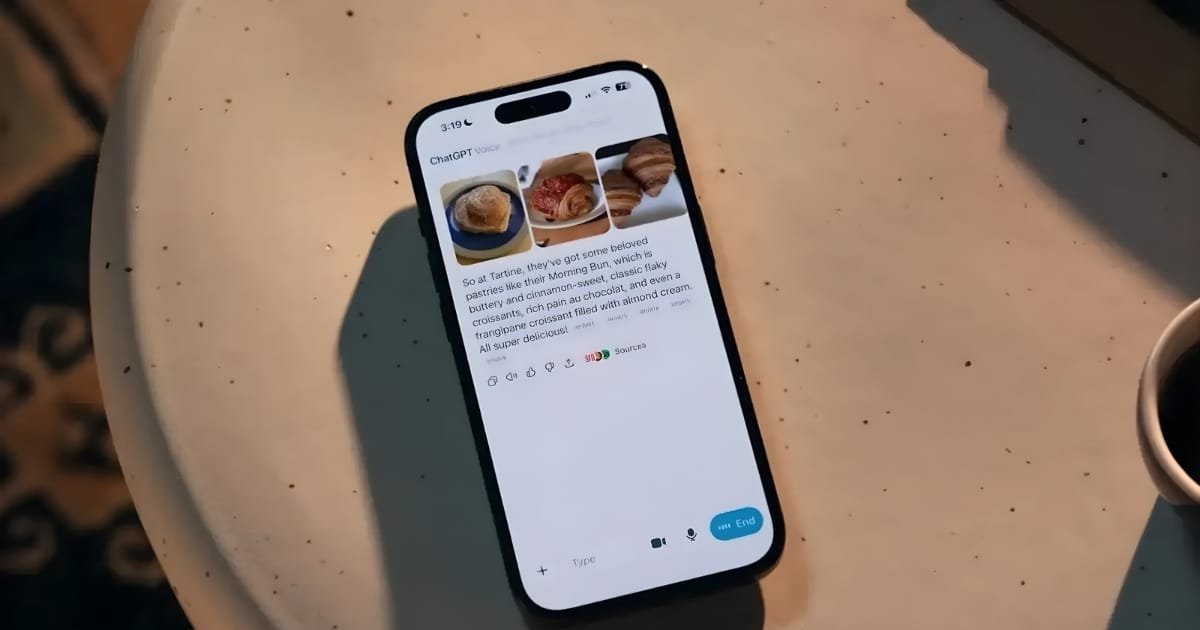





OpenAI has significantly updated the voice mode feature across all versions of ChatGPT (Android, iOS, web, and desktop), moving the voice assistant directly into the standard chat window for a more natural and seamless conversation experience.
Previously, users were taken to a separate, orb-like interface that hid the transcript and limited interaction options. The new update allows users to switch instantly between voice and text prompts within the same interface, enabling them to view a live transcript of the chatbot’s replies as they converse.
Last week I posted about AI coming for no-coders before coders.
This is the workflow I was talking about.
I used it on a voice AI project at a $4 billion unicorn. Within a couple of weeks, the engineering team had adopted it without being asked — and they wanted me to present… pic.twitter.com/SFGGntfWsH
— John George (@askjohngeorge) November 28, 2025
To activate the improved voice mode, users simply tap the waveform icon on the right side of the text prompt box. Once activated, the icon turns blue and ChatGPT initiates the conversation.
You May Like To Read: Alektra Launches Affordable Metro Electric Vehicles in Pakistan Starting at Rs. 1.045 Million
The integrated design now allows users to scroll back through the conversation history and includes options to send media, such as photos or files, through the microphone or camera.
This redesign is intended to make spoken conversations with the AI more intuitive, although users still need to manually hit the end button to conclude the voice interaction. For those who prefer the older design, a toggle option labeled ‘Separate mode’ remains available in the ChatGPT Settings menu.